I was privileged to be a part of the winning team in the NeurIPS 2025 Google Code Golf Championship, which took place August–October 2025. The goal of this competition was to solve 400 Python problems in as few bytes as possible (“code golf” refers to minimizing the length of programs). The problems consisted of grid-based puzzles from the ARC-AGI-1 training set, with extra test data coming from the ARC-GEN project. The ARC-AGI benchmarks are a sort of IQ test for AIs which have gained some renown, although this competition was about code golf and not about AI. For example, in this task, we need to crop the input grid so that its width matches its height:

It was an extremely close competition among the top three teams, and we traded places many times throughout the competition. We pulled ahead at the end and nabbed first place.
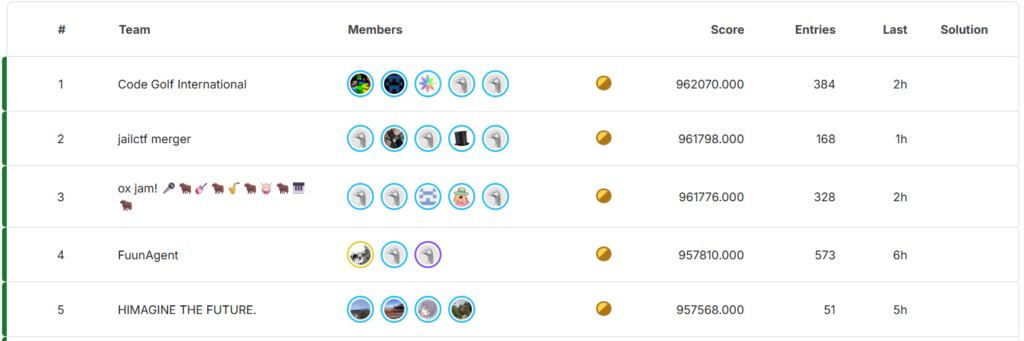
In this article, I’d like to give a personal narrative of the competition: what I did to prepare, interesting milestones from the competition, and golf tricks developed along the way. For a summary of the golf tricks without all the narrative, see our team’s official write up.
This article is my own perspective; opinions here are my own and not my team’s.
Announcement and preparation
I heard the announcement in late June via the code.golf discord. A code golf competition with cash prizes is a once-in-a-lifetime opportunity! There wasn’t a lot of other information about the format, except that Python would be the language.
I had dabbled a bit with Python golf, but almost all my expertise was in JavaScript golf. So, I had a clear objective: learn as much Python golf as possible in the next month. I reviewed the CGSE tips and made a two-pronged study plan: first, studying solutions from anagol (a long-running golf server with open solutions for expired problems), and second, practicing golfing in Python. I read through about 200 anagol post-mortems, and it was a great source for advanced tricks and strategies. (One quick example of trick I got from there: using -a%b instead of (b-a) to save a byte by avoiding parentheses.) Even though their Python version is a bit old—for example, it is missing the very versatile walrus := operator—the macro-level strategies are still very applicable to modern Python.
I practiced with a few dozen problems from code.golf and Byte Heist, focusing on grabbing golds on the easier problems, which was a good way to establish that I had solidified the fundamentals. A few of the code.golf problems were little more than finding the right library function, but I still found that useful for familiarizing myself with the libraries and learning to look for undocumented functions in them!
How do JavaScript and Python golf compare? My general feeling is that JavaScript has somewhat more emphasis on “micro” optimizations, enabled by its loose rules on types and permissive use of operators. Whereas Python has more “macro” emphasis: more useful libraries and built-ins (e.g., max()which is shorter and more flexible than JS’s Math.max()), powerful slicing syntax for array and string manipulation, and eval/exec shenanigans fueled by string multiplication (e.g., using exec("do_it();"*99) to loop). I also noticed serious irony with the Python motto “There should be one—and preferably only one—obvious way to do it”, because Python facilitates more alternative approaches than JavaScript typically does.
Altogether I was happy with how my study plan turned out. Although I certainly would benefit from more practice, I felt like I had made significant improvements and I was ready to compete.
Competition start
The competition began on Kaggle on July 31st. After the past month of speculating what the competition would be like, the format was finally revealed:
- The problems would consist of all 400 tasks from the ARC-AGI-1 training set, with extra test data coming from the ARC-GEN project.
- The submissions would be 400 independent Python scripts, each containing a function
pthat must return the correct output for every input. There are ~250 inputs for each problem, in the form oflist[list[int]]. The output was more flexible.list[list[int]]would be the natural type of the output, but (after the scorer was finalized 3 weeks in)tuplecould be used in place oflistandfloat|boolcould be used in place ofint. - Only standard library imports were allowed. In particular, since these are grid problems,
numpywould have been useful, but it’s not available. - The score of a submission would be the sum of
2500 - bytesfor each correct task. Equivalently, if all tasks are solved correctly, the score is 1 million minus the total byte count.
400 is an extremely large number of tasks to golf in three months; someone would need to do 4–5 tasks per day just to finish. However, competitive golf often necessitates deep thought to discover new techniques, and I often spend days thinking about single problems (or even months, see my past articles on Wordle compression). It was clear that time management would be critical to success. Teaming up and spending long hours golfing would be necessary to be competitive. Automation with AI is tempting given the workload, but I had rejected AI as being useful for golf based on past experience; see the appendix for more on this.
A few days into the competition, the code.golf community created a public spreadsheet so people could share individual task scores. Many competitors from code.golf quickly joined, and we kept adding features to the spreadsheet to make it awesome: fancy formatting, various leaderboards, and summary statistics.
Some code.golf terminology to know about the spreadsheet:
- “Gold” refers to a solution with the best score, even if it’s tied with others
- “Diamond” refers to a solution with the uncontested best score
It cannot be overstated how important this spreadsheet was to the competition dynamics. The official leaderboard only showed total scores, so there was nothing you could infer about the 400 individual tasks that composed the score. However, with individual task scores on the spreadsheet, you could see exactly where you’re missing bytes and where you’re ahead. This is invaluable for targeting your efforts. In golf, it’s often very uncertain how profitable it will be to keep looking for improvements in a problem. With the spreadsheet, you could instantly see if you’re missing something that others found. And in some cases, by looking for patterns in the scores, you can even guess what category of trick you might need to look for (e.g., if you’re two bytes behind in all the problems that have square grids, maybe you’re missing a trick for square grids).
If the individual task scores are so valuable, why would anyone be willing to share them and give their competitors an advantage? First, it’s fun: competing on 400 individual tasks is way more exciting than competing on one aggregate score. Second, making teams: your scores are like your résumé. In my own case, I wasn’t well established as a Python golfer, and I figured sharing my scores was the best option for finding teammates in the future.
Early days
The first three weeks of the competition, I worked individually (no team), and so did most others on the spreadsheet. I mostly focused on finding good solutions to the shorter problems, aiming to develop tricks and techniques that I’d later be able to apply to harder problems.
Lambda vs def
The very first observation is that lambda is shorter than def for defining the required function p:
def p(g):return g
p=lambda g:g
(Note on variable names: we’ll generally use g for the 2-dimensional grid, r for a 1-dimensional row, and x for individual cells.)
The limitation of lambda is that you need to put everything into one expression, whereas def allows multiple statements. But this limitation was not much of a bottleneck, because you can fit an awful lot into a single expression, so lambda was by far the most used.
List operations
Some of the very easiest problems could be solved just using list operations and no loops, although even these easy problems had opportunities for clever optimizations. For example, task 053 requires you to shift a 3×3 grid one row down:

One might golf it down like this:
#Task 053

#A natural first attempt: create a row of 0's and append 2 rows of g
p=lambda g:[[0]*3]+g[:2]

#-1b Take advantage that g[2] is always 0's
p=lambda g:[g[2]]+g[:2]

#-1b Use a slice to get g[2]
p=lambda g:g[2:]+g[:2]

#-1b Use a single slice on the doubled grid (clever!)
p=lambda g:(g*2)[2:5]
List comprehensions
Most problems aren’t so simple and required looping over the grid. List comprehensions were the shortest construct for doing this, so a typical solution started from the template:
#Short way to loop over the grid
p=lambda g:[[F(x,r)for x in r]for r in g]
This template is quite limiting, since it only looks at a single cell or row at a time, so it needed extensions for all but the simplest problems. But simple problems sometimes have devious tricks; consider task 267:

The idea is simply to recolor the shape based on the color of the bottom-left corner, but the solution involves some creative micro-optimization with list comparisons:
#Task 267

#Natural approach: zero out the first column (to erase the bottom-left cell)
#and replace non-zero cells with the bottom-left
p=lambda g:[[0]+[(x>0)*g[6][0]for x in r[1:]]for r in g]

#-2b Use unpacking instead of slice, and apply a math trick for (x>0)
p=lambda g:[[0]+[x%~x&g[6][0]for x in r]for _,*r in g]

#-3b Use the fact g[6][1] is 0
p=lambda g:[[0]+[g[6][x<1]for x in r]for _,*r in g]

#-5b Use a list comparison to simultaneously check for first column
#and non-zero cells.
#r>[x] is true when x = r[0], which colors the first column black
#r>[x] is true when x==0, which leaves black cells black
#r>[x] is false when r[0]=0 and x!=0, which matches all the cells that
#  need recoloring
p=lambda g:[[g[6][r>[x]]for x in r]for r in g]
Pop
One early trick that took me days to find was using list.pop for special iteration strategies, particularly popping from a list while iterating over it. Of course, in real-world programming, if you ever even think of mutating the length of a list while iterating over it, you should be ashamed. But in code golf, maintainability and legibility take a back seat to brevity. Fortunately for golfers, Python has well-defined behavior for modifying lists while iterating. (“Forward and reversed iterators over mutable sequences access values using an index. That index will continue to march forward (or backward) even if the underlying sequence is mutated.”) Several of the “bitwise” problems required pop tricks, for example, task 006:

In this task, the desired output is the bitwise AND of the two halves of the input grid, recolored to red. One might golf it down as follows:
#Task 006

#A good first attempt uses list indexing to get the right and left
#halves, and uses multiplication to do the "AND" operation
p=lambda g:[[r[k]*r[k+4]*2for k in(0,1,2)]for r in g]

#-2b Very sneaky use of list.pop to iterate over the two halves
#without needing to loop over indices
p=lambda g:[[x*r.pop(4)*2for x in r[:3]]for r in g]

#-2b (much later in the competition)
#Use eval() to construct a tuple without a for comprehension
p=lambda g:[eval('r.pop(0)*r[3]*2,'*3)for r in g]
Walrus
More complex operations could be performed in list comprehensions by using the walrus operator := to store state between iterations. For example, [[y:=F(x,y)for x in r]for r in g] stores the previous cell in the variable y. To initialize y, several tricks could be used. If it only needed to be initialized once, it could be made into an optional argument: p=lambda g,y=0:.... To initialize with each row:
#Generic
[[y:=F(x,y)for x in r]for r in g if[y:=5]]

#y = 0
[(y:=0)or[y:=F(x,y)for x in r]for r in g]

#y = 1
[(y:=1)*[y:=F(x,y)for x in r]for r in g]
A fun trick related to := was re-using variables inappropriately to avoid the cost of initialization, e.g., re-using function arguments and loop variables that were no longer needed. Although this solution to task 010 is from much later in the competition, it demonstrates how far this abuse could be pushed.

In this task, we color the vertical bars according to their ordering by height: the tallest gets color 1 (blue), the next tallest gets color 2 (red), etc. The best approach is not obvious, but the idea is to go row-by-row while tracking the previously drawn row: if it’s present in the previous row, keep it (so once a color is assigned to a column, it sticks); otherwise, color it according to the count in the current row (so new columns get assigned the correct color).
#Task 010

#z contains contents of previous row, initialized to all 0.
#The colored cells in the input are gray which is number 5, so y*sum(r)//25
#is 0 if y is 0, and #(colored cells) if y is colored
p=lambda g,z=[0]*9:[z:=[x or y*sum(r)//25for x,y in zip(z,r)]for r in g]

#-2b math: y*sum(r)//25 == y*sum(r)%6
p=lambda g,z=[0]*9:[z:=[x or y*sum(r)%6for x,y in zip(z,r)]for r in g]

#-3b: instead of creating z, reuse g to store the previous row.
#Because g initially contains lists but later contains ints, we use the
#trick that x*-1*-1 works on both: lists look falsy but ints are unchanged.
p=lambda g:[g:=[x*-1*-1or y*sum(r)%6for x,y in zip(g,r)]for r in g]

#-1b: Replace x*-1*-1 with x*-5 which is the same mod 6
p=lambda g:[g:=[(x*-5or y*sum(r))%6for x,y in zip(g,r)]for r in g]
Regular expressions
Another don’t-do-this-in-real-code technique was converting the input to a string, using a regular expression to edit the string, and then using eval to go back to a list. The overhead of converting to and from a string is offset by the brevity of regular expressions to match complex patterns. For example, task 258:

In this task, we want to fill in horizontal spaces between blue cells with red.
#Task 258

import re
p=lambda g:eval(re.sub("1, 0(?=, 1)","1,2","%s"%g))
The regex "1, 0(?=, 1)" matches the pattern blue, black, blue, using a lookahead to avoid consuming the last blue cell because it may need to be matched again. Then we replace the initial blue, black with blue, red, which is "1,2".
Fun fact: re and zlib are the only imports used in our final submission.
pysearch
pysearch is a utility that finds short Python expressions via massive brute-force testing. Prior to this competition, I had a loose rule that I would only use my own utilities for golf, because part of the fun is writing your own! But of course, for a cash-prize competition, I would use any tool at my disposal.
pysearch had obvious applications to many problems where color substitution tables were needed. For example, in task 016, it will find the formula x**10%95%18^4 to do the color mapping. pysearch also taught me the trick that (x>0)*y can be written x%~x&y provided x>=0, saving a byte in many tasks.
There’s quite a bit more to say about cool applications of pysearch, but I think that’s deserving of its own future article.
Recursion
Recursion was a very useful technique when an operation needed to be done symmetrically, usually either on columns plus rows (transpose symmetry) or in the four cardinal directions (rotation symmetry). The grid could be transposed using zip(*g) and rotated using zip(*g[::-1]), which are both quite short and therefore very useful as building blocks.
#A natural method to do recursion in a lambda function
p=lambda g,n=4:p(F(g),n-1)if n else g

#Better: use the fact that g*-n is falsy if n>=0
p=lambda g,n=3:g*-n or p(F(g),n-1)
This is what I call the “standard recursion template”: many people found it very early, and it is optimal in a lot of tasks. However, there are several special cases where it’s possible to do better—we’ll see several tricks throughout this write-up.
My first encounter with a recursion trick was for task 031. In the competition discussions, there were some hints that this task had a tricky save related to recursion. This problem simply required you to crop the grid:

However, golfing it was anything but simple; I spent 5+ hours over several days looking for the recursion trick. (Note: This was from the days before tuples were accepted by the judge—the final solution was simpler using filter.)
#Task 031 (pre-tuples)

#First attempt using the standard recursion template:
#Only keep non-zero rows, and also perform this operation on the transpose.
#Note the *r, syntax transforms the tuples coming from zip into lists,
#which the judge required at this time.
p=lambda g,n=1:g*-n or[r for*r,in zip(*p(g,n-1))if any(r)]

#-2b Clever trick using list comparisons: g always starts with an all-zero
#row, so [r]>g gives the same result as any(r)
p=lambda g,n=1:g*-n or[r for*r,in zip(*p(g,n-1))if[r]>g]

#-4b The recursion trick: instead of using a counter as the recursion
#variable, use a variable to hold a copy of g
p=lambda g,h=0:[r for*r,in zip(*h or p(g,g))if[r]>g]
#Alternate form:
p=lambda g,*h:[r for*r,in zip(*h or p(g,*g))if[r]>g]
Note that this is still not optimal: a future teammate of mine found another -2b save, which we’ll see shortly.
Teamwork makes the dream work
About three weeks into the competition, I was getting eager to start teaming up. It was clear to me that trying to compete solo wasn’t going to work. Although I had already solved 194 problems, most of them were fairly easy, and the next 206 would take much, much longer—not to mention, many of the 194 should be revisited to find better solutions.
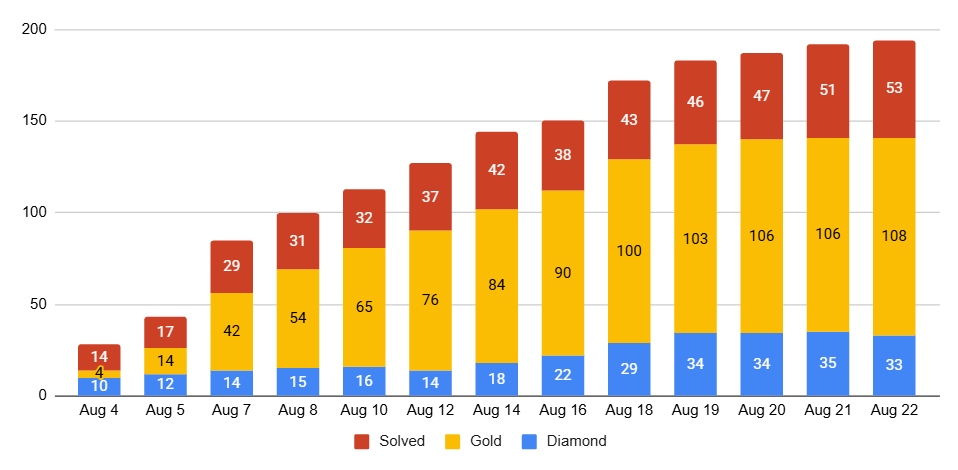
Our team started on August 22nd, and in a few days, we were a team of four. We were a bit slower to fill the fifth and final spot as we weren’t yet sure of the competition landscape, but soon there were other strong teams of five forming (particularly ox jam and jailctf), and we expanded to five on September 4th.
Recursion redux
This was the first time I had ever golfed collaboratively, and it was a really cool experience. Each time someone joined and we merged solutions, I learned new tricks and ideas. For starters, in task 031 which we just looked at, Sisyphus had a -2b save taking advantage that the first row is always cropped:
#Task 031, continued

#Pre-team solution
p=lambda g,*h:[r for*r,in zip(*h or p(g,*g))if[r]>g]

#-5b The judge changed and now accepts tuples, so filter works
p=lambda g,*h:[*filter(any,zip(*h or p(g,*g)))]

#-2b by doing p(g,*g) -> p(*g), which loses the first row
p=lambda g,*h:[*filter(any,zip(*h or p(*g)))]
Short loops
My teammates had found a fundamental looping trick that I had totally missed:
#Standard recursion template
p=lambda g,n=3:g*-n or F(p(g,n-1))

#Alternate method of looping: use a list comprehension on g with a dummy
#loop variable
p=lambda g:[g:=F(g)for _ in g][3]
Depending on necessary whitespace and other factors, this was sometimes shorter than the standard recursion template.
Exec
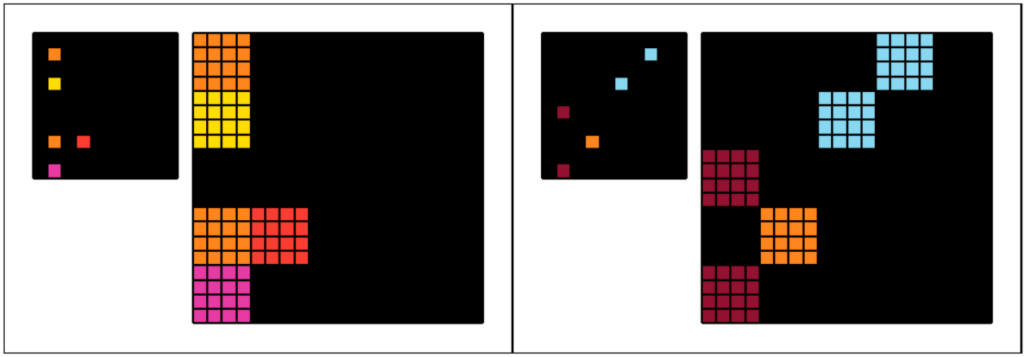
I also learned a neat trick to save a byte in several of the exec-based solutions. For example, in task 108, we expand single cells into 4×4 filled squares:
#Task 108

#Basic idea without exec. Use the slice [1::2] to get the source cells we're
#interested in. Use '0'*4 as a way to loop 4 times to create the 4x4 squares
p=lambda g:[[x for x in r[1::2]for _ in'0'*4]for r in g[1::2]for _ in'0'*4]

#Reuse variable names to create redundancy we can exploit
p=lambda g:[[g for g in g[1::2]for _ in'0'*4]for g in g[1::2]for _ in'0'*4]

#Use exec with string manipulation to eliminate redundancy
exec("p=lambda g:[[g"+" for g in g[1::2]for _ in'0'*4]"*2)

#-1b Cleverly use newline and comments to avoid needing two strings
exec('p=lambda g:[[g\nfor g in g[1::2]for _ in"0"*4]#'*2)
Later (next article) we’ll see a mind-blowing trick to eliminate exec and save even more bytes from this solution.
Map zip
I had spent a lot of the early days of the competition trying and failing to match 4atj’s spreadsheet scores, so when he joined the team, I was excited to see the source of the magic. One arcane incantation was using map(zip,g,h) for efficient iteration. For example, task 072 was one of the “vertical bitwise” problems:
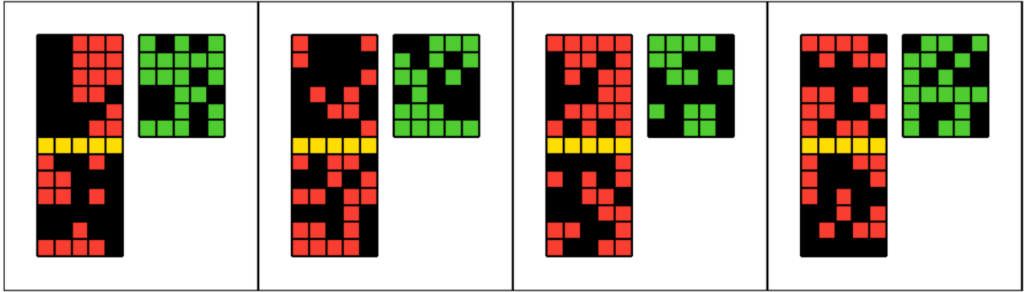
The output should be the XOR of the top and bottom halves, colored in green.
#Task 072

#Reasonable first attempt
p=lambda g:[[(x!=y)*3for x,y in zip(*r)]for r in zip(g,g[7:])]

#-1b Apply pop tricks: g.pop(7) to get the row seven below,
#r.pop(0) to iterate over the top row without making it a loop variable
p=lambda g:[[(x!=r.pop(0))*3for x in g.pop(7)]for r in g[:6]]

#-1b map zip trick: map(zip,g,g[7:]) makes it easy to simultaneously
#iterate over a row and the row seven below
p=lambda g:[[(x!=y)*3for x,y in r]for r in map(zip,g,g[7:])]
This solution is still not optimal—a big trick will be revealed in the next article.
map(zip) had other potent uses, such as iterating over all the 3×3 neighborhoods of the grid. First, map(zip,g,g[1:],g[2:]) creates an iterable over groups of three consecutive cells. The somewhat tricky step is to realize it can be applied again, creating an iterable over three consecutive rows, thereby capturing 3×3 neighborhoods:
#Iterate over 3x3 neighborhoods
[F(i)for*h,in map(zip,g,g[1:],g[2:])for*i,in map(zip,h,h[1:],h[2:])]

#Reuse variable names to create redundancy we can exploit
[F(g)for*g,in map(zip,g,g[1:],g[2:])for*g,in map(zip,g,g[1:],g[2:])]

#Use exec with string manipulation to remove redundancy
exec(f"[F(g){'for*g,in map(zip,g,g[1:],g[2:])'*2}]")
This leads to the solution for task 271:

#Task 271

#Use map(zip) trick to get 3x3 neighborhoods, and use str(g).count('1') to
#count how many blue cells are in the neighborhood. Use max() to select
#the neighborhood with the most blue cells, with a tiebreak prefering
#colored cells (to avoid picking neighborhoods with black cells).
exec(f"p=lambda g:max([str(g).count('1'),g]{'for*g,in map(zip,g,g[1:],g[2:])'*2})[1]")
Collaboration
Although we worked mostly independently, useful tricks and promising partial solutions were shared in our chat. A lot of collaboration was implicitly done by simply watching the GitHub logs, reviewing each other’s solutions and making improvements where you saw something. One of many highlights is task 007:

In this problem, you need to complete a partial checkerboard pattern of length three. This problem was memorable to me because prior to teaming up, this was one of my favorite diamonds. And then my teammates found multiple improvements to this deceptively simple problem.
#Task 007

#Good first attempt. Use sum(g,[]) to flatten the grid. Use a slice from
#the flattened grid to get all squares that should be the same color. Use
#max() to pick out the non-zero color.
p=lambda g,i=2:[[max(sum(g,[])[(i:=-~i%3)::3])for _ in g]for _ in g]

#-3b: Instead of keeping a counter to find the right slice, mutate the grid
#to move the slice into the right place! This was my pre-team solution.
p=lambda g:[[max(sum(g:=[[0,0]]+g,r)[9::3])for x in r]for r in g]

#-1b: The mutation can be optimized - my teammate Mukundan found this.
p=lambda g:[[max(sum(g:=g[1:3]+g,r)[9::3])for _ in r]for r in g]

#-2b: We don't actually need the loop variables, so we can use eval() with
#string multiplication instead. Via 4atj.
p=lambda g:eval(f'[{"max(sum(g:=g[1:3]+g,[])[2::3]),"*7}],'*7)
Part 2
With our team finalized, our next objective was to finish the 400 problems. To keep this post a reasonable length (if it’s not already unreasonably long!), the remainder is in a second article, with code compression, more golf tricks, and post-competition results.
Appendix: AI
There has been amazing progress in new AI models’ programming ability. They are great at routine tasks, and they are becoming competitive even for harder problems you might see in programming competitions. But can they golf?
In short, they are not incompetent, but they also leave much to be desired.
I occasionally try AIs for golf and have not had great results, but I admit I also have never made an effort on special training or prompting. They seem to struggle with counting characters, so that’s quite a handicap—an older model I tried once insisted > and >= were the same length over my objections. They frequently miss well-known tricks, even though they can recall the tricks when asked. It seemed very mixed how well they could solve problems; sometimes there’s a very clever idea, but sometimes it’s just a bad approach for golf. The newer models do seem to be improving, but they’re still not all the way there.
AI did not play a notable role in this competition for myself nor, as far as I know, any of the top three teams. (However, a few strong solutions done with AI assistance were shared publicly, and portions of them were adopted in our own submissions; more on that in the next article). The fourth-place team, among others, did use AI extensively (see their write-up, it’s very interesting!), and I am very surprised how good a result they got compared to what I thought was possible. There were even a few diamonds found by the AI-based teams, which I’ll also look at in the next article. But the gap from third to fourth was large, showing that human experts are still very much outperforming AIs, even though I believe this competition was quite favorable to AI-based approaches: the large number of problems and similar structure of all the problems favors automation.
All that said, I am optimistic that if an effort is made to optimize AIs for golf, they could be very good at it. They have amazing algorithmic knowledge, and they can try out ideas much faster than a human could, so they can go both wider and deeper in the search tree for optimal programs. I imagine that whatever techniques were used to achieve an IMO gold medal could be adapted to make AIs that golf at human expert level, too—both activities involve a similar interplay of creative “macro” ideas and very technical “micro”. Perhaps the biggest limitation is that good training data is hard to come by: golf is a bit of a niche hobby, and many competitions do not reveal solutions. At least after this competition, there are hundreds of very strong Python golf examples to train on!