Continuing where we left off in the previous article, about one month into the competition, our team was fully formed and busy golfing! Although we had some strong scores on individual tasks (as per the public scores spreadsheet), we were behind other teams on the number of tasks solved. Team “ox jam” had finished early: their member MeWhenI had finished all 400 problems just two weeks into the competition, even before teaming up—an incredible feat of skill! JailCTF came out of the woodwork on August 28th, posting very strong scores to the public spreadsheet for all 400 tasks.
Road to 400
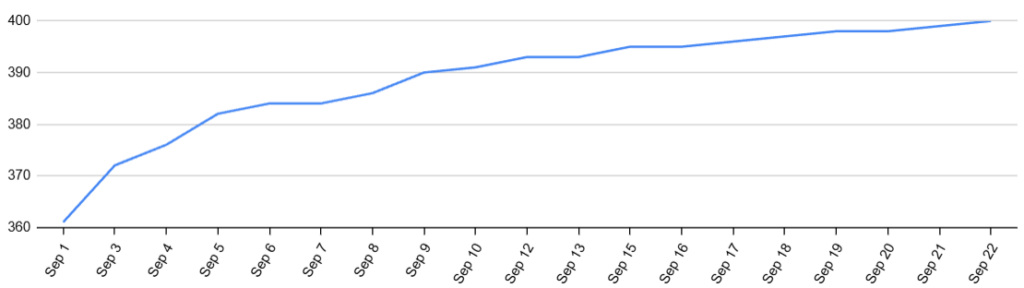
The remaining tasks we had left were complicated problems that were difficult to golf to a competitive level—in other words, the annoying problems. But they had to be done, because each is worth 2000+ points.
A lot of these tasks involved finding a pattern and replicating it, often with magnification or rotation involved. Regex was often a useful approach, but others used nested loops to brute-force search for the patterns (and were very slow!). One example with regex is task 080:

To the human eye, this is a pretty simple problem: replicate the pattern around each central point of the macro-grid. However, it’s hard to express succinctly in Python, making it a difficult task to golf.
#Task 080, whitespace added for readability
import re
def p(g):
  l=sum(g,[]);w=len(g)
  #Get colors: a = central, b = grid line, c = right, d = diagonal.
  #Max is used to find a patch that has 4 non-zero colors (or 3 if
  #there are no 4s), tiebreak for the bottom-right-most patch.
  a,b,c,d=max(({*(q:=l[i:i+3]+l[i-2*~w::w*w]),0},i,q)for i in range(w*w))[2]
  return[
    g:=eval(re.sub(
      #Find blank cells that are a given distance from a central cell
      f"(?={-~l.index(b)*x*'.'}{a})0",
      #y = color to put in
      "y",
      #Rotate grid
      f"{*zip(*g[::-1]),}"
    ))
  #(3,c) gets the adjacent macro-cells
  #(3*w+5,d) gets the diagonal macro-cells
  for x,y in[(3,c)]*4+[(3*w+5,d)]*4][7]
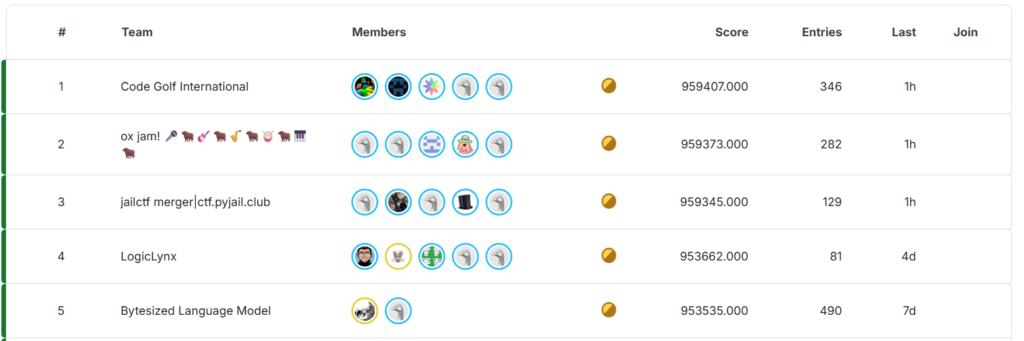
On September 22nd, more than halfway through the competition, we finally posted a submission with all 400 tasks. This just barely put us in first for the moment.
Compression
Python comes with built-in support for compression via the zlib library (among others), which implements the algorithm used in .zip files. Combined with exec, it can be used to run compressed Python code.
After compression, the data becomes a bunch of random bytes, and it’s not so obvious how to store random bytes efficiently in source code. There’s a bit of Python esoterica needed to make this practical. By default, Python files are assumed to be in UTF-8. This is bad because UTF-8 is not so good at storing random bytes: characters 0–127 are one byte each, but 128–255 require two bytes—in other words, each byte of compressed data takes about 1.5 bytes of UTF-8 source code. However, Python provides support for many other encodings by putting the comment #coding:XXX at the beginning of the file. Some encodings use one byte for all 256 characters; the best option is L1, whose name is only 2 bytes long.
#coding:L1
import zlib
exec(zlib.decompress(bytes("compressed_data","L1"),~9))
This works well, but fully optimizing it is a deep and difficult problem:
- There are many ways to compress the same data, some shorter than others. The compressor in
zlibdoes not generally find the optimal compression. - Some bytes need to be escaped in Python strings. For example, character code 0 is not allowed in Python source, so it needs to be escaped. The cost of these escape sequences needs to be considered in finding the best compression.
- There are many non-functional changes that can be made to the code that change compression outcomes. For example, renaming variables could gain or lose bytes.
My teammates did some work on a fancy compression script which starts with zopfli compression (which searches harder than zlib for better compression), uses the same Huffman trees, and then re-encodes in a way that optimally avoids escape sequences. We also used ad-hoc scripts to rename variables, which typically saved a handful of bytes.
Empirically, compression started becoming profitable around 200 bytes of source code. Golfing techniques completely changed once compression was used. The way zlib compression works, repeated strings are encoded by just their location and length, so they are very cheap. Instead of trying to write the shortest solution, you to try to write the most repetitive solution! One example is task 054:
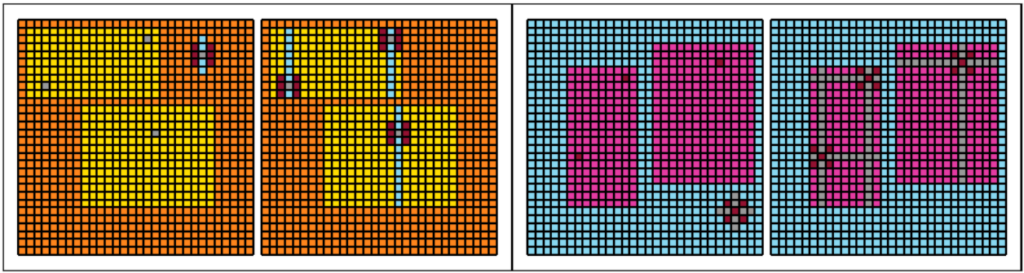
In this task, you must clone the “star” pattern inside each rectangle and extend the “rays”. Our uncompressed solution is:
#Task 054
def p(r):
 #Clone the grid because we need to be able to read the original colors
 f=[p*1for p in r]
 for p in range(28):
  for t in range(28):
   #Check if we have a star at coordinates (p,t)
   if r[p][t+1]==r[p][t-1]!=r[p][t]!=r[p+1][t]==r[p-1][t]!={r[p][t+1],r[p+1][t+1]}!={r[p+1][t]}:
    for e in range(28):
     for n in range(28):
      #Check if we have a match for the central star color at (e,n)
      if r[p][t]==r[e][n]:
       for o in range(-1,2):
        for h in range(-1,2):
         #(o,h) represent the offset from the star's center. Copy the
         #source star to the destination
         i=1
         if r[p+o*i][t+h*i]!=r[p+1][t+2]:
          f[e+o*i][n+h*i]=r[p+o][t+h];i+=1
          #Draw rays
          if r[p][t]!=r[p+o*i][t+h*i]!=r[p+1][t+2]:
           while r[e+o*i][n+h*i]!=r[p+1][t+2]:f[e+o*i][n+h*i]=r[p+o][t+h];i+=1
    #Erase the source star
    for o in range(-2,3):
     for h in range(-2,3):f[p+o][t+h]=r[p+1][t+2]
 return f
You can see how incredibly repetitive this solution is: range(28) is used over and over, and expressions such as f[e+o*i] are used over and over, even when it could have been simplified. In normal uncompressed golf, you’d assign these to variables (or use other techniques) to save space. But with zlib compression, the repetition is cheap. This code is 618 bytes uncompressed, but only 266 compressed.
| Task | Uncompressed | Compressed | Bytes Saved | % Shrinkage |
|---|---|---|---|---|
| 018 | 500 | 301 | 199 | 39.8% |
| 054 | 618 | 266 | 352 | 57.0% |
| 066 | 317 | 240 | 77 | 24.3% |
| 076 | 488 | 258 | 230 | 47.1% |
| 089 | 379 | 233 | 146 | 38.5% |
| 096 | 414 | 284 | 130 | 31.4% |
| 101 | 427 | 271 | 156 | 36.5% |
| 118 | 288 | 245 | 43 | 14.9% |
| 133 | 592 | 307 | 285 | 48.1% |
| 157 | 281 | 240 | 41 | 14.6% |
| 158 | 582 | 261 | 321 | 55.2% |
| 173 | 286 | 207 | 79 | 27.6% |
| 209 | 424 | 278 | 146 | 34.4% |
| 219 | 371 | 242 | 129 | 34.8% |
| 233 | 820 | 278 | 542 | 66.1% |
| 238 | 244 | 209 | 35 | 14.3% |
| 255 | 301 | 222 | 79 | 26.2% |
| 285 | 293 | 226 | 67 | 22.9% |
| 308 | 251 | 227 | 24 | 9.6% |
| 324 | 333 | 225 | 108 | 32.4% |
| 361 | 419 | 203 | 216 | 51.6% |
| 366 | 626 | 331 | 295 | 47.1% |
Open source spoils
One fascinating aspect of Kaggle is that they encourage sharing your work during a competition, creating a unique competition–cooperation hybrid. In this competition, the most experienced golfers were not sharing solutions, so the publicly shared content generally was well behind what we had developed. However, there were a couple notable exceptions, where useful scripts and strong solutions were shared.
First, MeWhenI from ox jam shared scripts for the zlib compression we just discussed. Although our team replaced this with better tech eventually, it was a very useful starting place and a huge contribution to the community.
Some very strong solutions were shared by the user garrymoss on September 8th. He had solved ten of the hardest problems using AI assistance, and he possessed their diamonds for quite a while. (The golf community was a bit stunned that AI was helpful for golfing these problems!) When his scores were finally all defeated, he shared his notebook with the solutions.
This was a favorable event for our team, because we had not yet solved all these problems! So, we had some free, strong solutions we could incorporate into our own submission. Interestingly, because we had better compression scripts, simply re-compressing these solutions got us a diamond on one of the problems. Of course, we eventually revisited these problems and found additional improvements, but I’d like to acknowledge that these solutions were very useful to us.
One of the shorter solutions—but still quite complex—in this collection is task 392. Our team already had a solution to this task, so it’s not one that we took from the notebook, but it demonstrates how many ideas and iterations go into these longer problems. We had 10 commits with improvements for this task.
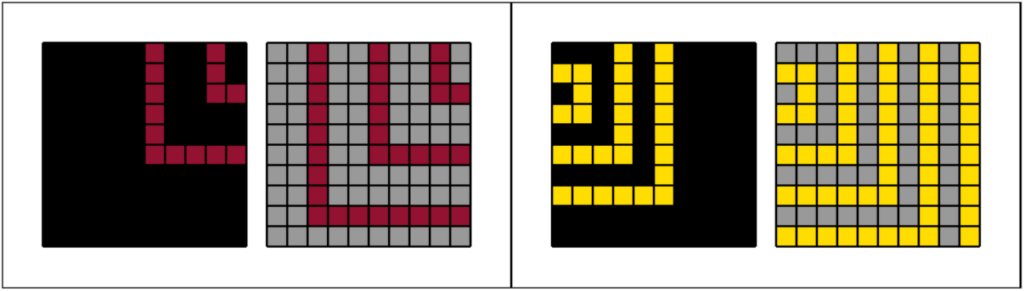
In this task, we need to continue the pattern of rings—which are spaced by either one or two blank cells—and recolor the background to gray. Here’s garrymoss’s solution and how our solution evolved:
#garrymoss's shared solution
p=lambda n,r=range(10):[
  [
    #Choose among stripe color, gray, gray
    (a:=max(sum(n,[])),5,5)[
      #Calculate L_inf distance to nearest colored cell
      min(
        max(abs(f-b),abs(m-s))for b in r for s in r if n[b][s]
      )
      #Check if pattern should be length 2 or 3
      %(3-(f'{a}, 0, {a}'in str(n)))
    ]
  for m in r]
for f in r]

#-5b An early solution by our team, same idea
R=range(10);p=lambda g:[
  [
    #-3b max(sum(n,[])) -> max(max(g))
    [w:=max(max(g)),5,5][
      min(
        max(abs(x-X),abs(y-Y))for X in R for Y in R if g[Y][X]
      )
      #-2b better check for pattern length
      %(3-(f'0, {w}, '*2in'%s'%g))
    ]
  for x in R]
for y in R]

#-6b: Tricky micro-optimizations
R=range(10);m=max;p=lambda g:[
  [
    #Color array is reduced from length 3 to 2
    [5,w:=m(m(g))][
      #It's better to do (abs(x-X),abs(y-Y)) as (x-X,X-x,y-Y,Y-x)
      #The 6*g[Y][X] has the same effect as "if g[Y][X]"
      m(6*g[Y][X]+~m(x-X,X-x,y-Y,Y-y)for X in R for Y in R)
      #Take advantage of negative indexing into the color array
      %((f'0, {w}, '*2in'%s'%g)-3)
    ]
  for x in R]
for y in R]

#-13b: New approach. Instead of computing L_inf distances, we use
#rotate-and-recursion to add new "layers" to the pattern, one at a time,
#building the pattern from inside to out.
p=lambda g,n=23:-n*g or[
  [
    #Use list.pop to implicitly reverse the row (needed for rotation).
    #Keep colored cells as they are. Otherwise, if previous cell is colored,
    #draw a new layer.
    r.pop()or(y>0)*
    #Look up the color for this layer based on the iteration count
    [5,w:=max(max(g))][
      n//4%((f'0, {w}, '*2in'%s'%g)-3)
    ]
  for y in[0]+r[:0:-1]]
for*r,in zip(*p(g,n-1))]

#-2b: Use eval to avoid needing to iterate over the row
p=lambda g,n=23:-n*g or[
  eval(f"""
    r.pop()or
    [5,w:=max(max(g))][
      {n}//4%(('0, %d, '%w*2in'{g}')-3)
    ]
    #Replaced (y>0) with any(r[-1:]), because we don't have y anymore
    *any(r[-1:]),
  """*10)
for*r,in zip(*p(g,n-1))]
Finally, I would also like to acknowledge the commentators on Ken Krige’s Chipping skills 3: Regex, who collaboratively golfed down a strong solution to task 096, which we borrowed from.
Shaving strokes
While we worked towards solving all the tasks, we also continued to hunt for general tricks.
map tricks
One trick was to use map(F,*g) as an alternative to [F(r)for r in zip(*g)], which eliminates the need to use zip. This isn’t helpful by itself, because F has to be written as a lambda in the map, which costs too many bytes. But in a couple cases, that cost could be offset by other gains:
#-1b: Depth 2 recursion with transpose
p=lambda g,h=0:[F(r)for*r,in zip(*h or p(g,g))]
p=lambda g:[*map(G:=lambda*r:F(r),*map(G,*g))]

#-2b: Initializing a state variable
[(a:=0)or[F(x,a:=...)for x in r)for*r,in zip(*g)]
[*map(lambda*r,a=0:[F(x,a:=...)for x in r],*g)]
The map form was more limiting than the list comprehension (e.g., comprehensions support filtering with an if), so these tricks couldn’t be applied everywhere. But they saved dozens of bytes across our submission.
f-string unpacking
We gained about 30 points from a 1-byte save for stringifying rotated grids. Many of our regex-based solutions required rotating the grid using zip(*g[::-1]) and then converting it to a string. The obvious way to convert to a string is not the shortest:
#-1b: f-string unpack trick: string repr for contents of a zip object
str([*zip(*g[::-1])])
f"{*zip(*g[::-1]),}"
Slice recursion
Recall the “standard recursion template”:
#Standard recursion template
p=lambda g,n=3:g*-n or p(F(g),n-1)
When golfing, it’s always good to ask the question, do we really need a new variable here, or can we sneak the information into an existing variable? Looking at the standard recursion template, perhaps there is a way to eliminate n and put the recursion depth information into g? Indeed, this is possible when the input has fixed length: we double the grid with each iteration, and use a carefully chosen slice to detect when the desired depth is reached:
#Slice recursion: applicable when g has fixed length.
#Saves a few bytes depending on the numbers.
#In this example, if g has length 10, then this will iterate 4 times.
p=lambda g:F(g[70:]or p(g*2))
exec
With only one week left in the competition, we also found another method to do looping with exec. Python has some quirks about how scope works inside exec and comprehensions (this competition used Python 3.11, and the behavior has changed in later versions), which sometimes makes variables invisible or unassignable. But the following template worked:
#Using exec to loop when transposing
p=lambda g:exec('g[:]=zip(*F(g));'*4)or g

#When rotating
p=lambda g:exec('g[::-1]=zip(*F(g));'*4)or g
These can save a couple bytes if F does not require a comprehension, and it sometimes opens up the possibility for more exec-related tricks. We saved dozens of bytes across our submission, but with only a week remaining, I’m not sure we were able to maximize the potential of this idea. A simple example of this trick in action is task 243, the easiest of the flood fill tasks:
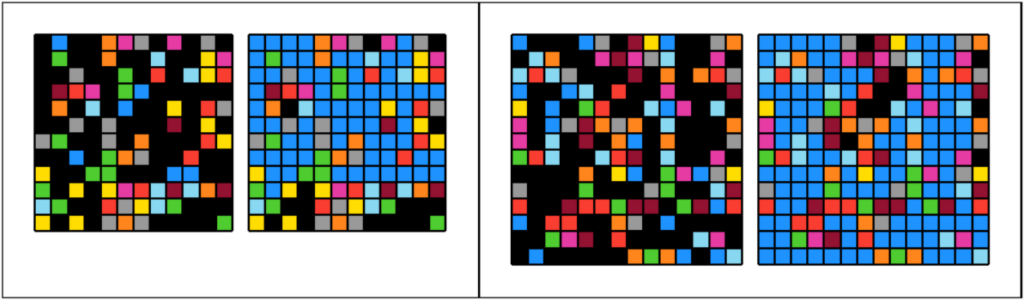
#Task 243
#Perform flood fill by replacing blue-black with blue-blue
p=lambda g,n=-95:g*n or[*zip(*eval(str(p(g,n+1)).replace("1, 0","1,1")))][::-1]

#-4b: exec trick
p=lambda g:exec('g[::-1]=zip(*eval(str(g).replace("1, 0","1,1")));'*80)or g
🤯: dimensional recursion
When JailCTF started sharing their scores on August 28th, one of the biggest surprises to me was a 6 byte save for the “vertical bitwise” problems, like task 072 we mentioned in the previous article.
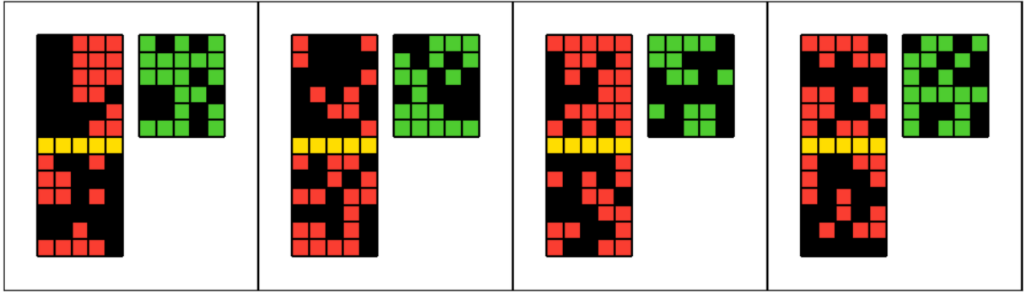
#How to save 6 bytes here??
p=lambda g:[[(x!=y)*3for x,y in r]for r in map(zip,g,g[7:])]
How can such a simple problem have such a huge save? I personally had spent hours trying to figure this out with no luck. It was Sisyphus who finally cracked them on September 12th.
The trick to this problem is an instance of a more general idea that I dubbed “dimensional recursion”, because you do recursion on the dimension of the input (2‑d grid, 1‑d row, 0‑d cell). It’s conceptually adjacent to what is sometimes called “deep mapping” or “structural recursion”—where a function is applied to the leaves of a nested container via recursion—but it isn’t restricted to a mapping of just the leaves. I think this was one of the most conceptually difficult tricks in the competition, because it breaks my usual mental model of what code is supposed to do! So, I’ll give a longer exposition how this works before revisiting task 072.
A lot of list operations in Python are equally valid whether the list is a 2‑d grid (list[list[int]]) or a 1‑d row (list[int]). The dimensional recursion trick is to re-use the same code for the 2‑d case and the 1‑d case via recursion:
#Template for "dimensional recursion"
p=lambda g:g*0!=0and[p(r)for r in g]or F(g)
g*0!=0 is a golf trick to test whether g is a list. Breaking it down, here is how the recursion plays out:
gstarts as alist[list[int]], sog*0!=0and we runp(r)for each rowring.- In the next level of recursion,
gis alist[int], sog*0!=0and we runp(x)for each cellxing. - In the final level of recursion,
gis anint, sog*0==0and we returnF(g).
The net effect is that F is run on every cell in the original grid. This is not profitable by itself:
#These both do the same thing
p=lambda g:g*0!=0and[p(r)for r in g]or F(g)
p=lambda g:[[F(x)for x in r]for r in g]
But it can be profitable if there’s more stuff in the list comprehensions that can be de-duplicated:
#Now dimensional recursion comes out ahead
p=lambda g:g*0!=0and[p(r)for r in g[::2]]or F(g)
p=lambda g:[[F(x)for x in r[::2]]for r in g[::2]]
There were a number of tasks where the outer and inner list comprehensions were the same, for example, task 108 from the previous article:

p=lambda g:[[g for g in g[1::2]for _ in'0'*4]for g in g[1::2]for _ in'0'*4]

#Our best solution without dimensional recursion
exec('p=lambda g:[[g\nfor g in g[1::2]for _ in"0"*4]#'*2)

#Naively converting to dimensional recursion loses two bytes
p=lambda g:g*0!=0and[p(x)for x in g[1::2]for _ in`0`*4]or g

#-5b switching to map and using fancy slice tricks
#This was our team's submission
p=lambda g:g*0!=0and[*map(p,(g*8)[2:]*5)][9::20]or g

#-8b no slicing needed with a doubly-recursive approach: do
#one row at a time with p(g[1]) and do the rest with p(g[2:])
p=lambda g:g+g*-1and[p(g[1])]*4+p(g[2:])or g
Dimensional recursion becomes super powerful when adding arguments to p, but also super confusing as the arguments change meaning with each step of the recursion. Let’s finally solve the vertical bitwise tasks:
#Solution to task 072
p=lambda g:[[(x!=y)*3for x,y in r]for r in map(zip,g,g[7:])]

#-6b dimensional recursion with arguments
p=lambda g,u=[]:g*0!=0and[*map(p,g,u+g[7:])]or(g!=u)*3- When
pis first called with the original gridg,uis empty, and we getmap(p,g,g[7:]) - In the second step of recursion,
pis called withgbeing a row of the grid andubeing the row seven below. Becausemapiterates over the shortest of its arguments and then stops,map(p,g,u+g[7:])is equivalent tomap(p,g,u)—u+g[7:]is functionally equivalent tou or g[7:]. - In the final step of recursion,
gis a single cell (i.e., an int) anduis the cell seven below. We run(g!=u)*3to get the correct output color.
There were many creative ways to use dimensional recursion with arguments, and I was still trying to find new opportunities all the way to the end of the competition. One personal victory was in task 040:

The algorithmic trick to this task is that the “horizontal” and “vertical” cases can be handled exactly the same: color each cell according to the nearest corner of the grid. I found a way to succinctly get the nearest corners using dimensional recursion:
#Task 040
#Non-recursive solution:
#Take advantage that the grid is always 10x10, so we can use a counter
#k to track our position in the grid. Then k//50 is is 0 in the upper half,
#1 in the lower half. k//5%2 is 0 in the left half, 1 in the right half.
p=lambda g,k=-1:[[(x>0)*g[(k:=k+1)//50*9][k//5%2*9]for x in r]for r in g]

#-3b math tricks
p=lambda g,k=9:[[x%~x&g[(k:=k+1)//60*9][k//5%-2]for x in r]for r in g]

#-7b dimensional recursion, see explanation below
p=lambda g,h=[]:g*0!=0and[*map(p,g[:1]*5+g[9:]*5,h+g)]or h%~h&g- In the first step of the recursion, we call
map(p,g[:1]*5+g[9:]*5,h+g). The expressiong[:1]*5+g[9:]*5]is five copies of the top row follow by five copies of the bottom row. The expressionh+gis simplyg, becausehis empty in the first iteration. - In the second step of the recursion,
gwill hold a copy of either the first or last row of the original grid, andhwill be a row from the original grid. Nowg[:1]*5+g[9:]*5is five copies of the leftmost cell and five of the rightmost, effectively giving us the cell of the nearest corner.h+gwill get truncated to justh. So, themapexpression is effectively pairing up cells from the original grid with the nearest corner. - In the final step of the recursion,
gwill hold a copy of a corner cell, andha cell from the original grid. We return the valueh%~h&g, which is a math trick equivalent toh and g, giving us the desired final color.
960k
We were the first to post a score of 960,000 on September 28th, breaking a benchmark that earlier in the competition, many would have guessed was the limit. This represents an average solution length of just 100 bytes. However, there was still a month left to find more improvements!
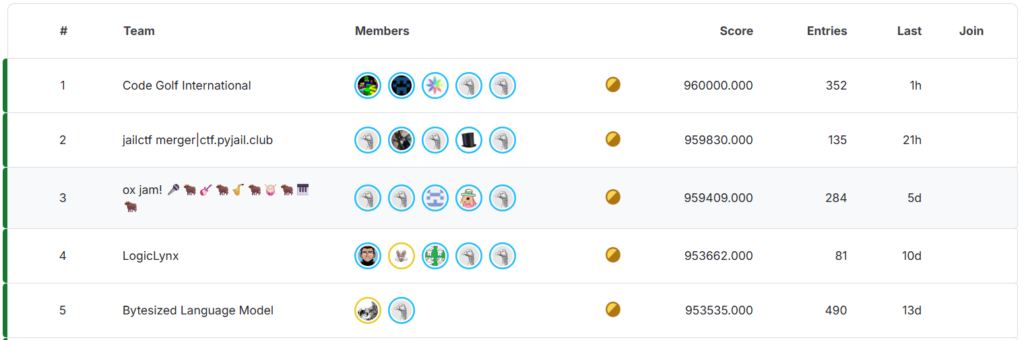
The public spreadsheet had been quiet since around September 10th, as the top three teams stopped sharing scores. Although the spreadsheet was a lot of fun and everyone loved it, the competition was very close and leaking information to your competitors was a major concern.
That changed on October 4th, when JailCTF filled in their column with a 960,000 score. Of course, I immediately dove in and looked for any insights from the new data. What really surprised me is that our team’s improvements and JailCTF’s improvements were quite independent: combining our scores with JailCTF’s would give a score over 961,000. In particular, there were ~700 points of improvements from JailCTF that were new to us, giving us some clues which tasks were worth revisiting. The fact that we weren’t converging also suggested that maybe our scores are still far from optimal. Indeed, that proved to be true: we were able to continue finding improvements, including many that were quite large, steadily throughout the rest of the competition.
The final push
Besides Jail’s 960k on the spreadsheet, there were no major leaks coming from the top teams, so the leaderboard was the only real source of news in the final month. We all continued to make submissions to update the leaderboard scores, but people may not have been submitting their best, so I couldn’t even trust the leaderboard. But since the top three teams all kept trading places, I figured that we were still quite close. Any extra effort I put in would not be wasted!
The last few days, I had completely cleared my schedule and was making an effort to review all 400 problems. Of course, I didn’t have time to make a fresh attempt at all 400 problems, so this is where I really relied on a “golfer’s instinct”: judging what looked optimized and what looked like there might be room to improve. Finding improvements was getting really difficult—probably 2/3 of my attempts led to nothing—but once in a while there was a big save or new approach that paid off.
One source of these late improvements was converting regex-based solutions into list comprehension-based solutions. Regex was a very ergonomic technique for handling more complicated patterns, but the more difficult non-regex methods also needed to be explored, because it isn’t always clear which approach will come out shorter. Drawing on three months of experience with grid problems, I was finally getting comfortable with stacking list comprehension techniques together to produce the complex behavior needed to replace regexes. One example is task 280:
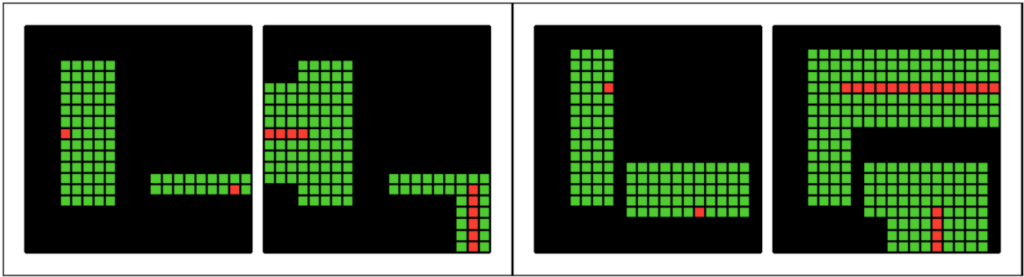
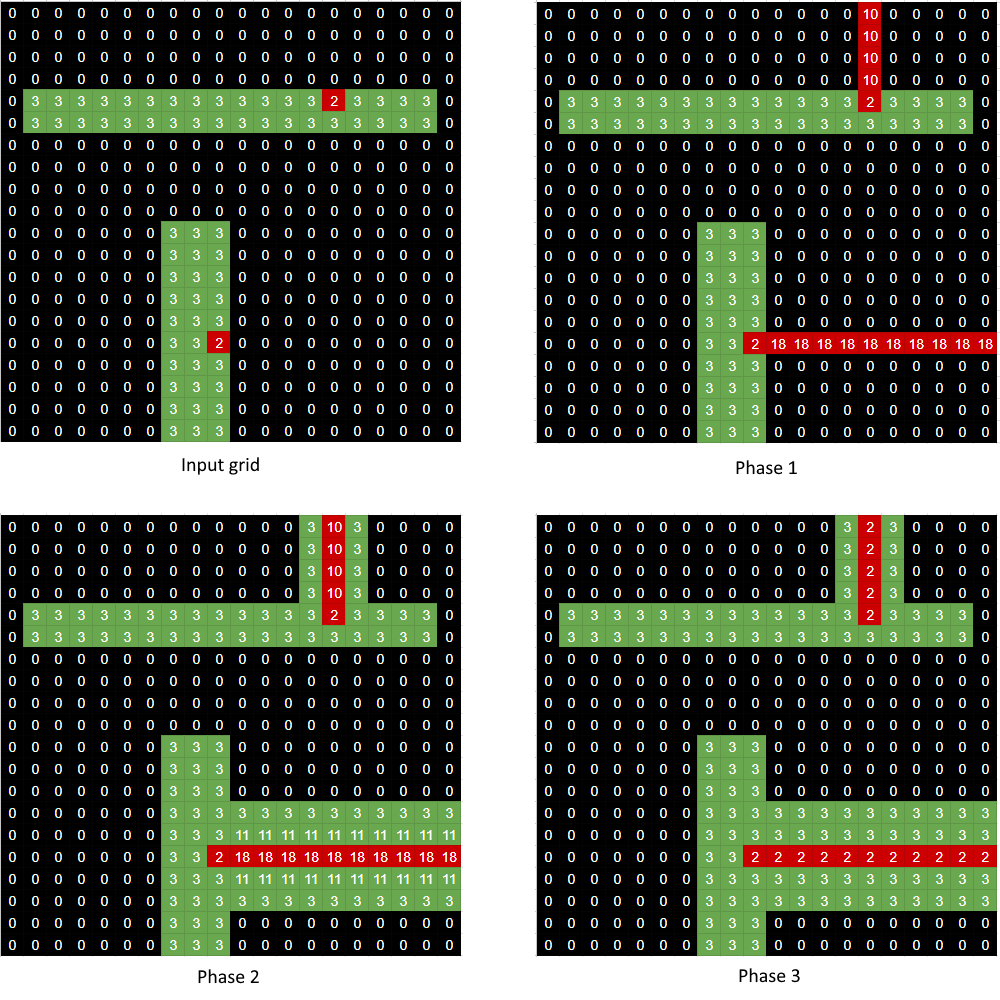
In this task, you need to extend the red dots into beams surrounded by green, and the width of the new green beams needed to be one less the source green beam. This task was a bit tricky because two phases are required: one phase to count the width of the source beam, and another phase to draw the result. We originally had a regex solution, but saved 31 bytes (!) by converting to a list comprehension:
#Regex-based solution
import re
p=lambda g,k=67:-k*g or p(
  eval(
    re.sub(
      *[
        #Last phase: replace our width hints (4-9) with red (2)
        "[4-9] 2",
        #Second phase: Use width hints to draw green (3) cells
        "0(?=(,.0){,%d},.%d) 3"%(k%5,k%5+4),
        #First phase: write beam width hints to the grid along the
        #projection of the red cells
        r"0(?=[^1-9)]*(2(,.3)+)) len([\1])+2"
      ][k>>5].split(), #k>>5 chooses which phase
      #f-string unpack trick to get rotated grid string representation
      f"{*zip(*g[::-1]),}"
    )
  ),
  k-1
)

#-31b: list comprehension solution
p=lambda g,n=11:-n*g or[
  [P:= #Track previous cell
    [
      #These formulas have been heavily optimized (by hand and pysearch)
      #so it may not be apparent how they produce the correct results!

      #First phase: track (beam width)*8+2 in the variable "a", and
      #write it to the grid along the projection of the red cells.
      ((a:=(8%~P<x)*a+x%2*8|2)>2>x)*a,

      #Second phase: draw the new green beams.
      #If previous cell's beam width is > 0, and this cell
      #is 0, then write (beam width-1)*8+3 to the grid
      -6%(P-2|1-x|x),

      #Last phase: remove upper bits that held beam widths, so we
      #are left with the final colors
      x&3
    ][n//4]or x #n//4 chooses which phase
    for x in r
  ]for r in zip(*p(g,n-1)) #rotate and recursion
  if[a:=0,P:=0] #Initialize "a" (width counter) and P (previous cell)
][::-1]
To help visualize how this solution works, here are the results after each phase:
The end
There was a funny interaction on discord just before the end. No one was submitting new scores to the leaderboard, so everyone was very curious what hidden scores the teams had. One member of JailCTF trolled with a fake screenshot of their score:
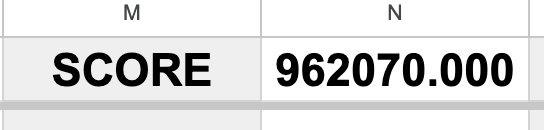
A day later, guess what our team’s final score was? 962,070!
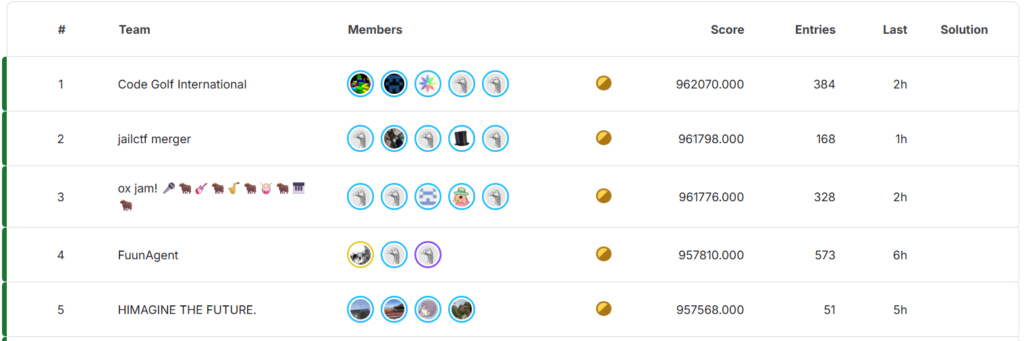
The final leaderboard had us ahead by 272 points; our momentum in the final week had carried us to first after a very close competition.
Post-competition
Although I was getting delirious from sleep deprivation, I had to stay up for the action after the competition closed. We all posted our score breakdown to the public spreadsheet and started sharing solutions and tricks.
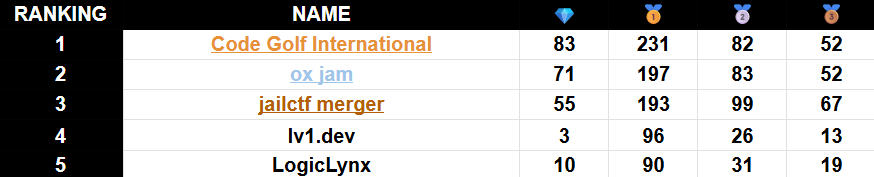
The biggest surprise is that the compilation score—using best known solution to each task—was 963,197, more than 1100 points above our score. Over half the tasks—231 to be exact—had diamonds, meaning that only one team found the best score. We were much farther from optimal solutions than I expected.
There were at least two cool general tricks our team missed. “Pop recursion” came from JailCTF, and you can read the story of its discovery in their writeup—basically, it was found by randomly deleting pieces of code. The trick rotates a square grid by 90 degrees by just popping from the back of rows—no zip(*g[::-1]) necessary. One example is task 015:

#Task 015, JailCTF: Pop recursion
p=lambda g,i=-7:g*i or p([[r.pop()%9|36%(6^-[0,*r][i//7])%13for r in g]for*r,in g],i+1)
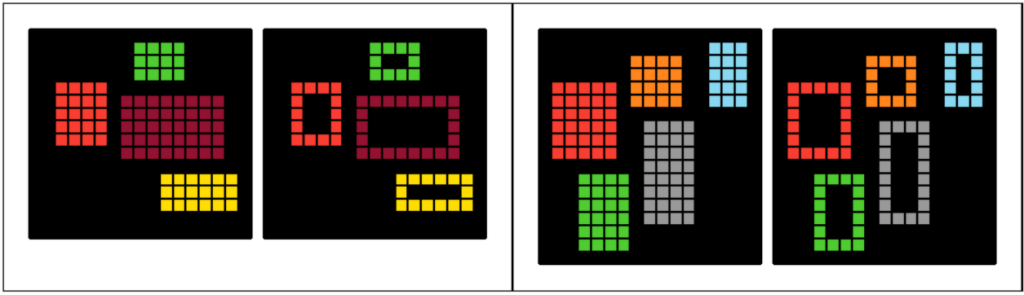
Second, ox jam found a nice application of dimensional recursion to get adjacent cells, which is useful in quite a few tasks. One example is task 098:
#Task 098, ox jam
#Dimensional recursion: w becomes a tuple of adjacent cells
p=lambda g,*w:g*0!=0and[*map(p,g,g[:1]+g,g[1:]+g,*w)]or g^min(w)
JailCTF’s solutions also revealed a very nice way to do hash-based lookups in Python, see Lydxn’s article Fun with magic hashes in Python.
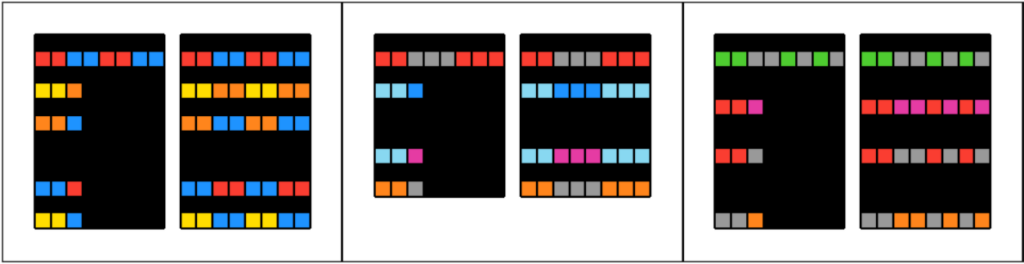
There were a few diamonds found by AI-based teams. I don’t think any were “inhuman” solutions, but one with a particularly cute trick is task 197 from LogicLynx (although I’m not sure whether this was 100% AI or if there was human assistance):
#Human teams' solution
p=lambda g:[[r[g[1].index(x)]for x in g[1]]for r in g]

#-3b LogicLynx: Use dict.setdefault to do the color mapping
p=lambda g:[[*map({}.setdefault,g[1],r)]for r in g]
A compilation of post-competition improvements is maintained in this repo, currently at a score of 963,477, representing 280 points of improvements. (No doubt this could go lower, but I think most of us are quite tired of golfing these problems!) The most absurd improvement is task 277, which was improved from 155 bytes to 109 bytes, a 46-point difference!

#The general idea behind these solutions is a 2-phase approach:
#First, give each cell a "hash" that is calculated by applying a formula
#that mixes together neighboring cells somehow. This will encode the
#shape that the cell resides inside.
#Second, color the cells according to whether the hash is unique or not.

#Competition best by ox jam
z=[0];p=lambda g,k=38,h=2,q=z*9:~k*g or p([q:=[v and[v%63,P|p|v,h:=h*64,v//sum(g,z).count(v)][k>>4]for P,p,v in zip(z+q,z+r,r)]for*r,in zip(*g[::~0])],k-1)

#-46b Post-competition best, multiple contributors
#It's a bit crazy that this works
p=lambda g,i=11:-i*g or p([*map(lambda*r,v=0:[v:=-~v*c*i|c%~c&3&~sum(g,g).count(c)for c in r][::-1],*g)],i-1)
Final thoughts
Despite how much we’ve covered, there are still many more interesting solutions—perhaps something for future articles. This really demonstrates just how deep code golf is: although the problems all came from the same domain of grid transformations, there were myriads of tricks and techniques involved.
Although it was a really huge workload, the competition was quite a bit of fun, and I hope this write-up conveyed that. It was an amazing opportunity to collaborate with and compete against a bunch of brilliant golfers!